
Mikäli vastaan tulee tilanne, jossa versiolla 2026 (32.0.X) kaaviosymbolin laitekortilla nappi Projektista ei tee mitään, niin alla on ohjeet tilanteen korjaamiseen.
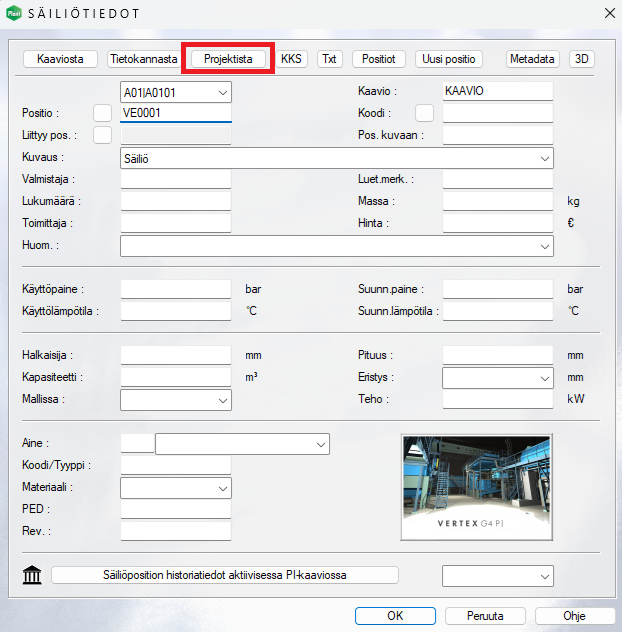
Laitekorttien formaatti-tiedostoja on voitu muuttaa versiossa 2025 tai sitä aiemmissa versiossa asiakkaiden toimesta. Versiossa 2026 on käytössä uusi nimi toiminnolle, joka toteuttaa Projektista-napin toiminnallisuuden. Oletuksena formaattitiedostot sijaitsevat kansiossa \system\forms\ ja räätälöidyt tiedostot sijaitsevat vastaavasti kansiossa \system\forms\.
Käytämme esimerkkinä säiliöiden laitekortin formaattitiedostoa Press_vessel.
Versiossa 2025 tilanne on tämä:
if (language=0) then
option_button= D "Kaaviosta" @CopyPiAdb.prg P
option_button= D "Tietokannasta" @PipeCompSel.prg P
option_button= D "Projektista" @PIDATAFROMWG C
else
option_button= D "From schema" @CopyPiAdb.prg P
option_button= D "From dbase" @PipeCompSel.prg P
option_button= D "From project" @PIDATAFROMWG C
Versiossa 2026 tilanne on tämä:
if (language=0) then
option_button= D "Kaaviosta" @CopyPiAdb.prg P
option_button= D "Tietokannasta" @PipeCompSel.prg P
option_button= D "Projektista" @COPYPOSDATATOPI C
else
option_button= D "From schema" @CopyPiAdb.prg P
option_button= D "From dbase" @PipeCompSel.prg P
option_button= D "From project" @COPYPOSDATATOPI C
Mikäli teillä on näitä räätälöityjä formaattipohjia, niin niissä on version 2025 jäljiltä vanha ohjelman nimi. Päivittämällä yllä olevissa, lihavoiduissa kohdissa tekstin seuraavasti PIDATAFROMWG >> COPYPOSDATATOPI, niin toiminto alkaa taas toimia. Päivitys täytyy tehdä kaikille räätälöidyille laitekorttien formaateille.
Hakusanat: projektista, laitekortti, attribuuttidata, ei toimi, ei tee mitään
If you encounter a situation where the button From project on the device card of the diagram symbol in version 2026 (32.0.X) does nothing, below are the instructions to fix the issue.
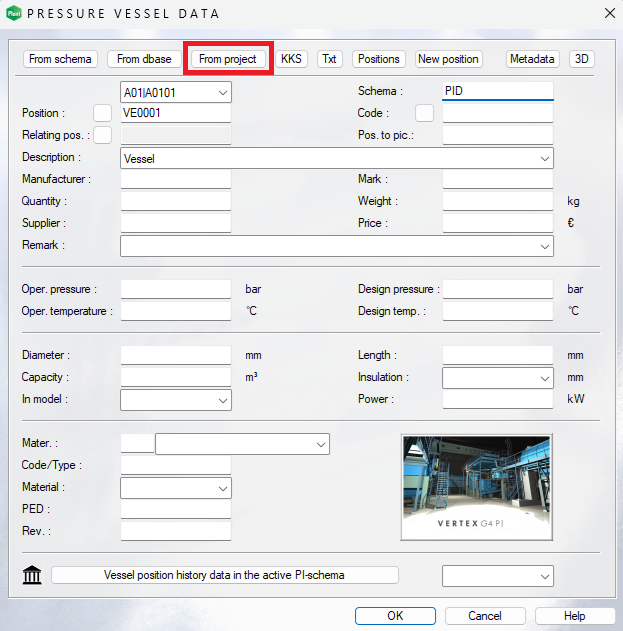
The format files of device cards may have been modified by customers in version 2025 or earlier. In version 2026, a new name is used for the function that implements the functionality of the From project button. By default, the format files are located in the folder \system\forms\ and customized files are correspondingly located in the folder \custom\forms\
We use the format file of the device card for vessels as an example, called Press Vessel.
The situation in version 2025 is as follows:
if (language=0) then
option_button= D "Kaaviosta" @CopyPiAdb.prg P
option_button= D "Tietokannasta" @PipeCompSel.prg P
option_button= D "Projektista" @PIDATAFROMWG C
else
option_button= D "From schema" @CopyPiAdb.prg P
option_button= D "From dbase" @PipeCompSel.prg P
option_button= D "From project" @PIDATAFROMWG C
The situation in version 2026 is as follows:
if (language=0) then
option_button= D "Kaaviosta" @CopyPiAdb.prg P
option_button= D "Tietokannasta" @PipeCompSel.prg P
option_button= D "Projektista" @COPYPOSDATATOPI C
else
option_button= D "From schema" @CopyPiAdb.prg P
option_button= D "From dbase" @PipeCompSel.prg P
option_button= D "From project" @COPYPOSDATATOPI C
If you have these customized format templates, they contain the old program name from version 2025. By updating the bolded text above from PIDATAFROMWG to COPYPOSDATATOPI, the function will start working again. The update must be done for all customized device card formats.
Keywords: from project, device card, attribute data, attribute data card, does not work, does nothing